Linux 6.17 has just been released, and it’s already running here at Root Commit.
[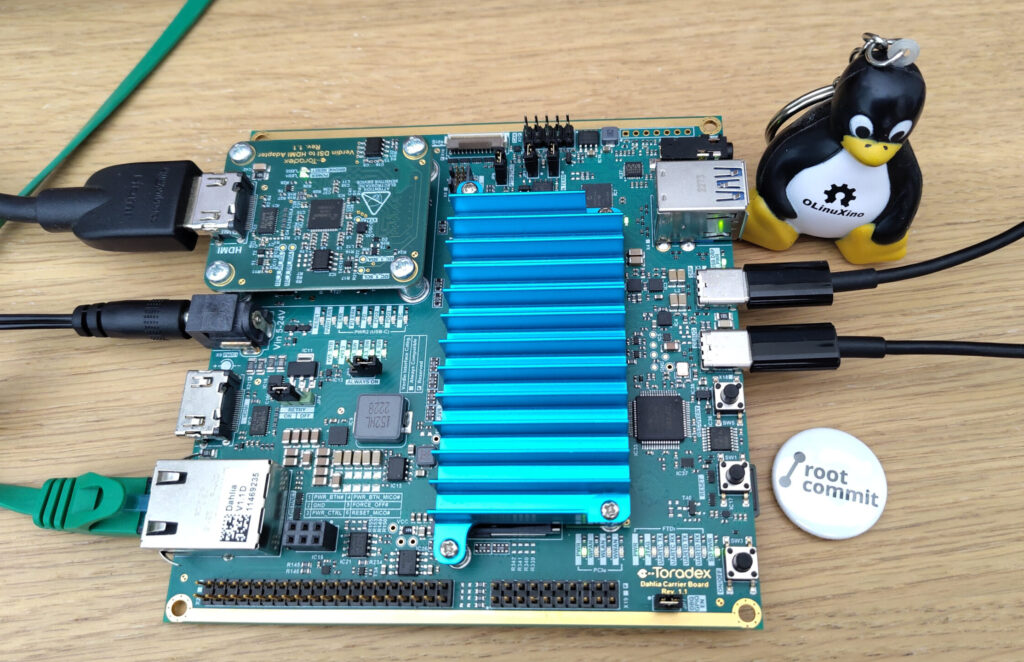](/wp-content/uploads/2025/09/verdin-imx8mm-dahlia-scaled-e1759155037961.jpg)The first system it's been running on is this [Toradex Verdin iMX8M Mini SOM](https://developer.toradex.com/hardware/verdin-som-family/modules/verdin-imx8m-mini/) (below the heat sink!) on the [Dahlia Carrier board](https://developer.toradex.com/hardware/verdin-som-family/carrier-boards/dahlia-carrier-board). I'm using this board for a medical device project at the moment.
Here are my notes for building Linux 6.17 for this device:
- Get the Linux 6.17 sources (through
gitor tarball) sudo apt install clang llvm lld(if necessary)- In the Linux source directory, run:
export ARCH=arm64<br></br>export LLVM=1``<br></br>make defconfig<br></br>make menuconfig
InPlatform Selection, keep onlyNXP i.MX SoCsupport make dtbs<br></br>make -j16 Image- Prepare a microSD card with 2 partitions:
- Copy these files the first partition:
cp arch/arm64/boot/dts/freescale/imx8mm-verdin-nonwifi-dahlia.dtb /media/$USER/boot<br></br>cp arch/arm64/boot/Image /media/$USER/boot - Eject and plug the SD card in the board, and in U-Boot (assuming it’s already installed on eMMC):
setenv mainlineboot 'load mmc 1 40000000 Image; load mmc 1 48000000 imx8mm-verdin-nonwifi-dahlia.dtb; booti 40000000 - 48000000'<br></br>setenv bootargs 'root=/dev/mmcblk1p2 rootwait rw'<br></br>saveenv<br></br>run mainlineboot
On any other board, assuming a bootloader has already been installed, it’s going to be very similar!
See my Yocto - Testing Mainline Kernel and Bootloader presentation for using Yocto to build a complete SD card image to boot your board.

 The second system Linux 6.17 has been running on is my Geekom AMD A8 mini PC. A great performance / cost ratio for the desktop, compared to a laptop with similar CPUs.
Here are my notes for building Linux 6.17 on my Ubuntu PC:
- Get the Linux 6.17 sources
- In the Linux source directory, copy the configuration from your running kernel:
cp /boot/config-uname -r.config - Upgrade the configuration to the new kernel:
make olddefconfig - Compile the kernel and build Debian packages:
make -j 16 bindeb-pkg - Install the newly built packages:
cd ..<br></br>rm linux-image-*dbg*.deb<br></br>sudo dpkg -i *.deb - Reboot
See my Build and run the mainline Linux kernel on your PC presentation and video for instructions that work on the most popular GNU/Linux distributions.
